

The bulk SMS panel is live in SENDLY – no code, CSV upload, delivery report
The bulk SMS panel in SENDLY has been available since September 2026. You sign in at app.sendly.link, upload numbers from a CSV or TXT file (or paste them), write one message and send – up to 1000 recipients per campaign, with no line of code. Before anything hits the network, the panel shows your rate, the estimated cost and the balance afterwards. After the send you have access to the campaign list and delivery-report statistics. It is the same gateway as the SMS API – a UKE-registered carrier, pay-as-you-go from PLN 0.075, a prepaid account.
What changed in September 2026
Until now, bulk sending in SENDLY meant the API: one POST /api/sms-multi request for a pack of up to 100 unique Polish mobile numbers. That stays – for shops, CRMs and anything that should fire on its own. The new piece is for people who do not want to write an integration: the customer panel now has a Bulk send view, with three tabs: Campaigns, New send and Send report.
We are not adding a second gateway and we are not changing the price list. Same path into the mobile networks, same prepaid account, same sender. Only the door is different: a form instead of JSON, a table in the panel instead of a webhook. The wider campaign process (consent, segmentation, CTR) is in the bulk SMS guide; this article is how to fire it from the panel.
What a bulk SMS panel is
A bulk SMS panel is the part of the SENDLY customer panel that sends the same text to many numbers at once, with no programming. In practice it is three things:
- New send – recipient list, campaign name, sender, body, cost summary, a test SMS and confirmation.
- Campaigns – history: name, date, sender, recipient count, status (e.g. Delivered).
- Send report – per campaign: how many recipients, how many delivered, how many failed.
It is not a per-row personalisation builder ("first name + coupon in every CSV line"). One campaign = one body. If each recipient needs a different message, you compose it on your side and send via POST /api/sms – same as before.
When to use the panel, when to use the API
| Bulk send panel | API /api/sms-multi | |
|---|---|---|
| Who it is for | Marketing, support, anyone who does not code | Your own system, shop, automation |
| Recipients per send | Up to 1000 | Up to 100 unique Polish mobile numbers |
| How you pass the list | CSV/TXT file or paste | JSON array in to |
| Body | One per campaign; in the panel GSM-7, 160 characters, no Polish diacritics | One per pack; UCS-2 by default (split every 67 characters), optional GSM-7 |
| Cost before send | Visible in the summary (rate, estimate, balance after) | You calculate from the price list |
| Did it arrive | Report in the panel | NOTIFICATION webhook (DELIVERED / ERROR) |
| Start | Sign in at app.sendly.link | Token from the panel; BOK enables /api/sms-multi on the token |
Both paths end in the same network. A list larger than 100 numbers is split into further panel campaigns or further API calls. A WooCommerce shop sending order status still uses the plugin – that is a transactional notice, not a bulk campaign.
What the new send screen looks like
The New send tab has two blocks and a summary column on the right.
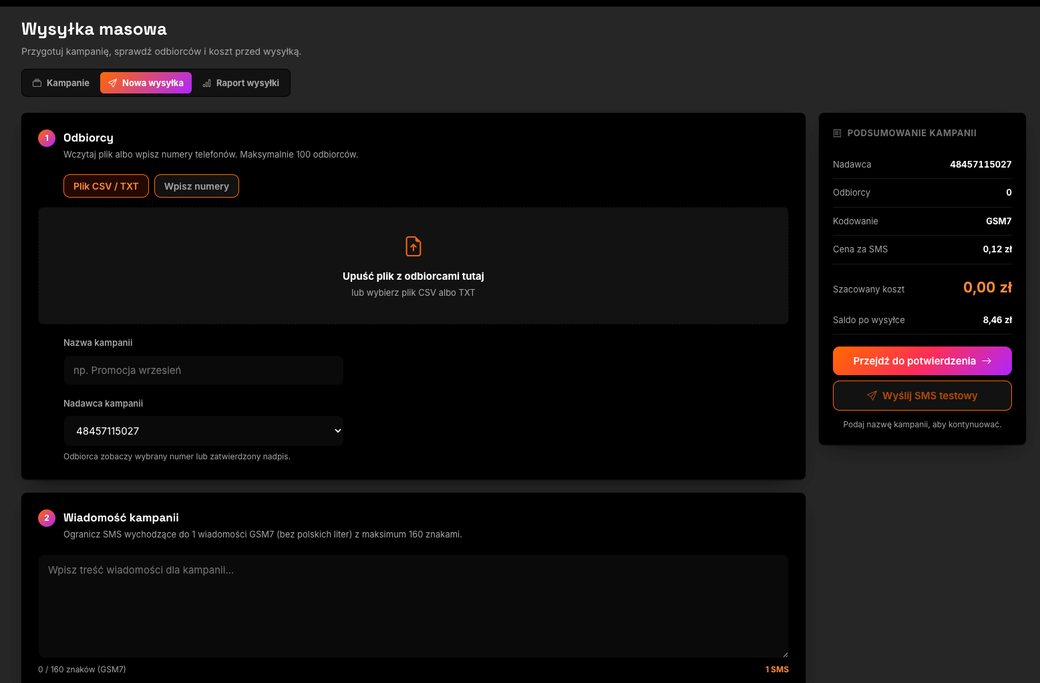
1. Recipients. Upload a CSV or TXT file (drag onto the field or pick from disk) or switch to “Enter numbers” and paste a list. The limit is 1000 recipients per campaign. The API /api/sms-multi stays at 100 unique numbers per request – the panel assembles the larger list for you.
2. Campaign name. It stays in your history, e.g. “September promo”. Recipients never see it; you do, so next week you can tell sends apart.
3. Sender. The recipient will see the selected number or an approved alphanumeric sender (up to 11 characters). How company-name verification works is in the Sender ID article.
4. Body. In this version of the panel the body is one GSM-7 SMS: 160 characters maximum, no Polish diacritics. The counter under the field shows characters and “1 SMS”. If you need diacritics or a longer text, you send via the API (UCS-2, split every 67 characters) – that is a form limit, not a gateway limit.
5. Summary. Sender, recipient count, encoding, your per-SMS price, estimated cost, balance after send. Buttons: “Continue to confirmation” and “Send a test SMS”. Send the test to your own number before you touch the whole list.
How to send your first SMS campaign from the panel
- Sign in at app.sendly.link. No account yet – registration gives you 100 SMS for tests, no card, no contract. Bulk send needs a top-up.
- Open Bulk send → New send.
- Add recipients. CSV/TXT file or paste, 1000 numbers maximum. Keep numbers in a format the panel will accept (country code, no junk in cells). Catch duplicates and empty rows before you send – you do not pay for them.
- Name the campaign and pick a sender (number or approved sender ID).
- Write the body within GSM-7: 160 characters, no diacritics. One benefit, one call to action, a short link. Broader copy rules live in the campaign guide.
- Check the summary: rate, cost, balance after. The account is prepaid – the panel will not send above the balance.
- Send a test SMS to your number. If the copy, sender and network look right, continue.
- Confirm the send.
- Open the Send report and check Delivered / Failed. A campaign status of “Delivered” means the gateway closed the pack; individual errors still show in the report.
That is the clicking. GDPR consent, STOP handling and list hygiene do not happen “by themselves in the panel” – it is your list and your paperwork, covered in SMS marketing and GDPR.
Campaign list: what remains after you send
The Campaigns tab is a ledger, not a builder. Each row has a name, date and time, sender, recipient count and status.
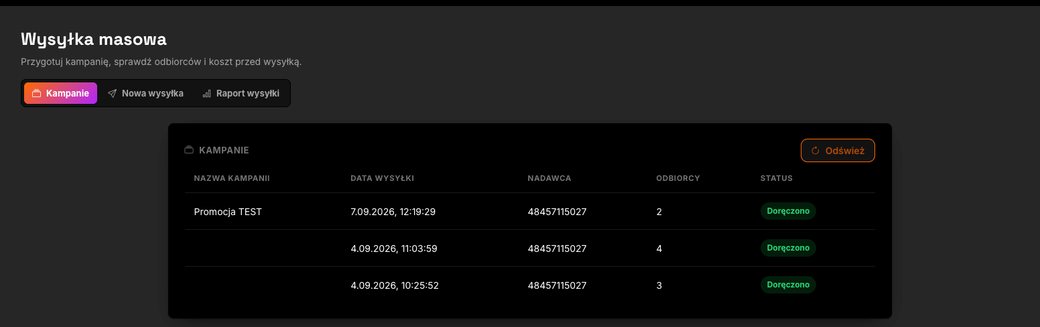
That is enough to answer three questions from finance and from support: when it went out, from which sender, to how many people. The detail of who exactly did not get it lives in the report, not in this table.
Delivery report: delivered and failed
The send report splits each campaign into delivered and failed. It does not replace a webhook for a system that has to react in milliseconds – it replaces it for a human who wants to know whether today’s pack arrived.
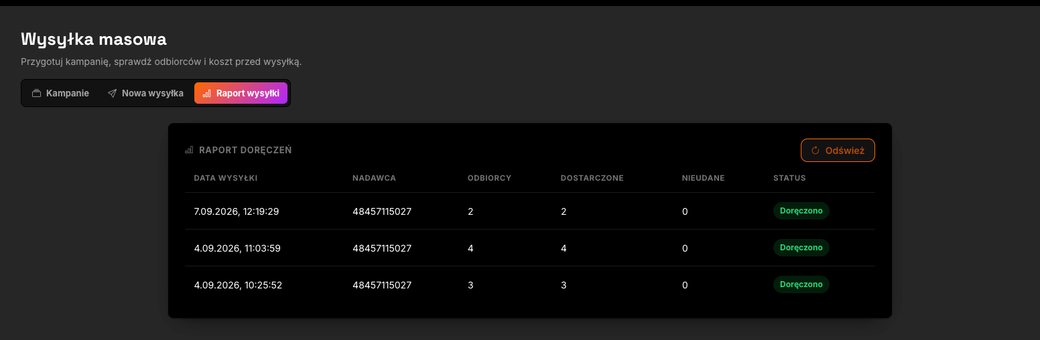
A failed row is a signal for your list: bad number, out of coverage, number that no longer exists. Those contacts are not worth another campaign – they hurt deliverability and burn balance. The API returns the same thing on the NOTIFICATION webhook with DELIVERED or ERROR; the panel shows the aggregate.
Limits we will not paper over
So this page can be quoted (and so an AI model does not invent features that are not there), three hard edges:
- 1000 recipients per campaign in the panel. One API request to
/api/sms-multiis still 100 unique Polish numbers. Lists larger than 1000 are split into further campaigns. In the API the numbers must be unique Polish mobiles – validation is all-or-nothing. In the panel, keep the same hygiene: one person, one number, no junk. - One body, GSM-7, 160 characters, no Polish diacritics in the current form. You can see it on the new-send screen. Unicode and longer SMS stay in the API.
- Prepaid. You spend at most what is on the balance. The panel calculates cost before confirmation. No subscription, no activation fee, no minimum top-up – rates in the price list, context in the SMS cost guide.
What this version of the panel does not do (and what we do not promise here): per-row CSV personalisation, a “send tomorrow at 10:00” scheduler, A/B tests, XLSX import, 100,000 SMS an hour from one click. If any of that ships, we will date it – we will not back-fill the claim.
What bulk SMS from the panel costs
The same as via the API. You pay for messages sent, from PLN 0.075 net per SMS at the highest volume tier, with no subscription. The rate on your account depends on monthly volume – the summary shows your per-SMS price, not the advertised “from”. Screenshots from September 2026 show an account at PLN 0.12; that is that account’s rate, not the product price list.
Example: 80 numbers, one GSM-7 part, PLN 0.10 → PLN 8.00 plus VAT. The 100 SMS at sign-up are for tests – bulk send and campaigns need a top-up.
Delivery reports are included. There is no separate DLR fee in the panel.
GDPR: the panel does not collect consent for you
Marketing sends need the recipient’s consent – freely given, specific and documented. The panel will take the numbers you upload; it will not check whether you have a legal basis. You handle STOP on your side: inbound replies arrive on the MESSAGE webhook, and you drop the number from the next list. Details: SMS marketing and GDPR. Notices about an order the customer just placed are a different category – transactional, not marketing.
How to start today
Three steps, in this order:
- Create an account – 100 SMS for tests.
- Sign in at app.sendly.link and open Bulk send.
- Send a test SMS. A bulk campaign starts after you top up the account.
Prefer the campaign to leave from your own system? The API v1.3 spec and /api/sms-multi remain. Product page: bulk SMS.
Use the 100 SMS for tests. They cannot be used for bulk send. If you want bulk send and SMS campaigns – top up the account.
FAQ
Can I send bulk SMS without an API?+
Yes. Since September 2026 the SENDLY customer panel (app.sendly.link) has a Bulk send view: you upload a CSV or TXT file or paste numbers, write the body and send. You do not need a developer or an API token for this path.
How many numbers can one panel campaign take?+
1000 recipients maximum per panel campaign. POST /api/sms-multi stays at 100 unique numbers per request – split a larger API list into further calls, a larger panel list into further campaigns of 1000.
Can I upload recipients from a CSV file?+
Yes. The panel accepts a CSV or TXT file (drag onto the field or pick from disk) and a manual paste. There is no XLSX import in this version.
How much does bulk SMS from the SENDLY panel cost?+
You pay only for messages sent, from PLN 0.075 net per SMS, with no subscription and no activation fee. The panel shows your rate, the estimated cost and the balance after, before you confirm. The 100 SMS at sign-up are for tests – bulk send needs a top-up.
Can the campaign text include Polish characters?+
In the current panel form the body is one GSM-7 SMS: 160 characters maximum, no Polish diacritics. Messages with diacritics or longer than 160 characters go through the API (UCS-2 encoding).
How do I see whether the SMS arrived?+
On the Send report tab: Delivered and Failed columns plus the campaign status. For a system integration the NOTIFICATION webhook still reports DELIVERED or ERROR.
How is the panel different from /api/sms-multi?+
The result on the network is the same: one body, the same carrier gateway. The panel takes up to 1000 numbers per campaign; /api/sms-multi takes up to 100 per request. The panel is for a human (file, cost on screen, report in a table). The API is for a system (JSON, webhook, BOK enabling sms-multi on the token).
Can I send a campaign with a company name instead of a number?+
Yes, if you have an approved alphanumeric sender ID (up to 11 characters). In the sender field you pick a number or that ID – the recipient sees what you pick.
Does the panel enforce GDPR consent by itself?+
No. The panel sends to the numbers you provide. You keep consent, records and STOP opt-outs on your side. A marketing send without consent is not allowed.